Good fit
- The candidate list changes as the team learns.
- The response needs its own fields and grouped updates.
- Several teams need one trusted record and a clear handoff.
- Earlier decisions and their sources must remain reviewable.
Security response coordination
One responder sorts the shared sheet while another enters a host update. Rows disappear from view, and you stop to make sure the value landed in the right field. Then someone asks for a number, and you give one you don't believe.
KnownScope holds the response between the candidate list and the ticket. It keeps the assessment and the reason it changed. Jira or ServiceNow keeps the fix.
Private preview. Rob Fuller builds the first Campaign with each team, so the number of places is limited by his calendar.
The actual product
These are screens from the running application, not drawings of it. The hostnames are invented. Everything else is the product.
Assessment grid
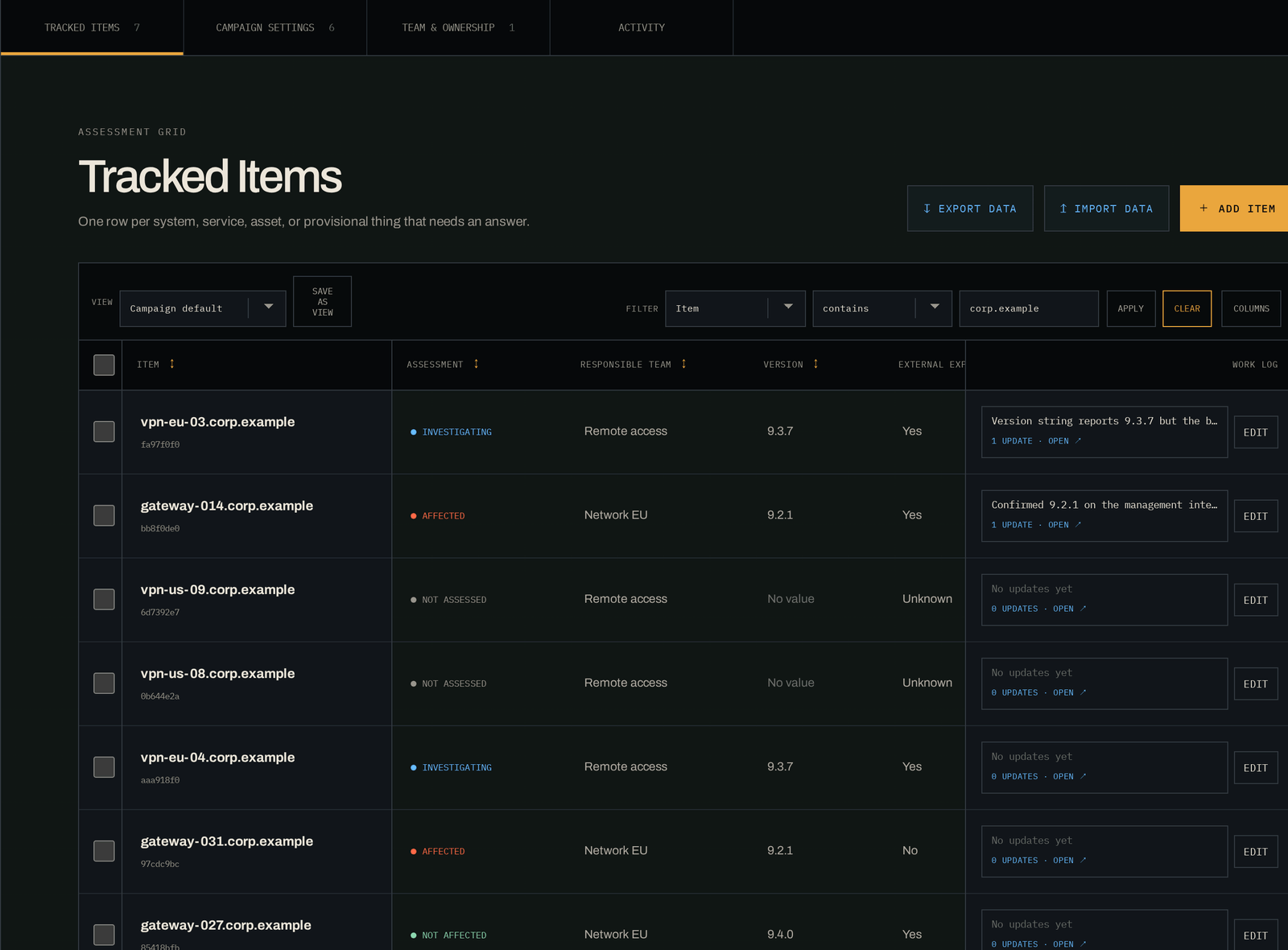
Scrollable image. Use the arrow keys to move across it.
The problem
Teams reach for spreadsheets and ticketing because they are there and familiar. A spreadsheet holds rows. Jira holds tasks. The team still has to maintain the current scope and the reasoning behind it while the candidate list changes.
Shared sheet
Another responder sorts or filters the shared view while you update a host. Rows move or vanish off your screen. You check that the hostname and the cell still belong together, then ask whether the status count includes the hidden rows.
A filter someone left on is how a team reports a set of systems clear when nobody has looked at them.
Ticket queue
The team turns a 100-host candidate list into one Jira issue per host before assessment is complete. The assignee opens a wall of critical work even though the team doesn't yet know which systems are affected.
Jira is the right place for the fix. During assessment, one issue per candidate splits a single question across 100 records, and whoever receives them spends the week closing tickets by hand.
Status call
A scan supplies the candidates. Manual assessments land in a sheet, while assigned remediation lands in Jira. When leadership asks for the current count, someone has to reconcile the records before answering.
So the number you report is the number you can defend, not the number you have, and you say "as of Tuesday" to cover the gap.

Why Init6 is building KnownScope
I have been the one getting shouted at for being slow, for not having a number yet, because I had stopped trusting the sheet in front of me. Being late with the right answer is a bad place to stand. Being quick with the wrong one is worse. KnownScope is what I wanted in that room: one list, every decision attached to it, and no argument about what the count includes.
Rob Fuller, founder of Init6. Twenty-five years in the field, teaching at Black Hat since 2013. More about the company.
How KnownScope helps
A Campaign is the working record for one advisory, exposure, supplier incident, or investigation. It holds the candidate items, the fields your team chooses, access rules, Work logs, and change history.
Import, before anything is written
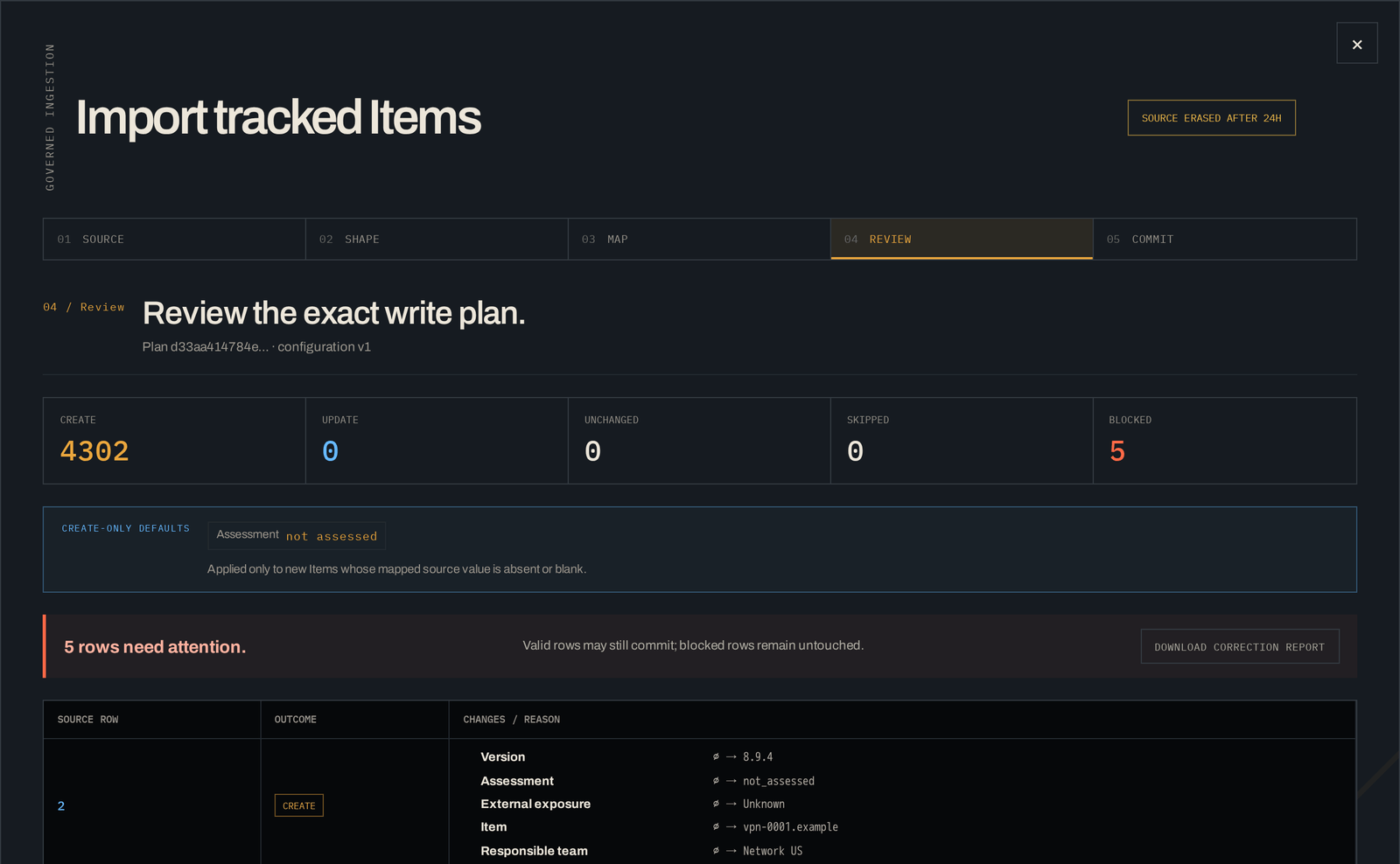
Scrollable image. Use the arrow keys to move across it.
Scanners and inventories supply candidate items. Chat carries live discussion. Jira or ServiceNow owns the fix once you know what it is. Evidence stays in the repository approved for it. KnownScope holds the list, the decisions, and the Work log in between.
Inputs
Scanner results, inventory, supplier notices, CSV files, and pasted lists.
KnownScope
Campaign fields, assessment decisions, Work logs, access, and change history.
Remediation
Jira, ServiceNow, change systems, or the work queue your team already uses.
Before you read further
Good fit
Poor fit
Where it fits
Across these cases, the candidate list changes while several people test assumptions, add context, and hand work between teams.
What KnownScope does
The product is built around the complete response. The same Campaign carries the list, the reasoning, and the published status as the team learns.
Open a Campaign from a template or a blank page, choose the fields the response needs, and give Owners, Workers, and Viewers the access their role requires.
Paste rows or import CSV and XLSX files. Review mappings, invalid values, and duplicate candidates before the list becomes part of the Campaign.
Filter the list, save team views, and apply one decision to a selected group while every Item remains available for its own assessment and follow-up.
Attach Work logs to the Campaign and its Items. Keep revisions, mentions, authorship, and change history with the list they explain.
Use stable identifiers to spot Items that may represent the same system. Review the suggestion, link the records, and reverse the decision if later facts disagree.
Set a reporting rhythm, publish a fixed snapshot, and answer leadership questions from the same governed list the response team is working.
The company
KnownScope is a product of Init6. Init6 was founded in 2017. Its work starts with a specific job that security teams are struggling to keep organized.
About Init6 and the people behind it →Next step
Bring one you have already run. We'll walk it through the Campaign, from the first messy list to the handoff, and you can judge it against what actually happened.