Product
One working record for a changing response scope.
A Campaign is the working record for one advisory, exposure, supplier incident, or investigation. It holds the candidate items, the fields your team chooses, access rules, Work logs, and change history.
A vendor advisory, in the product
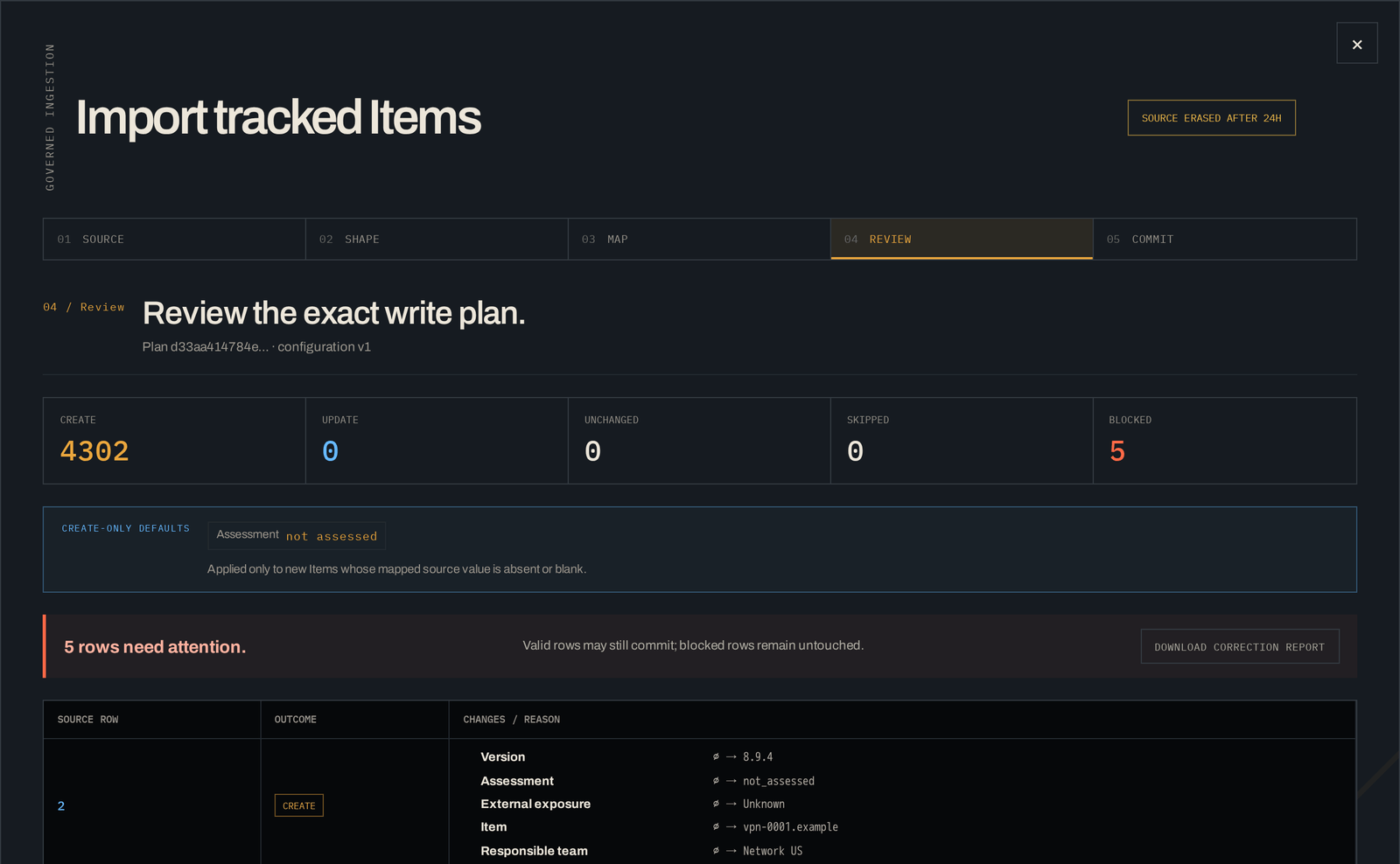
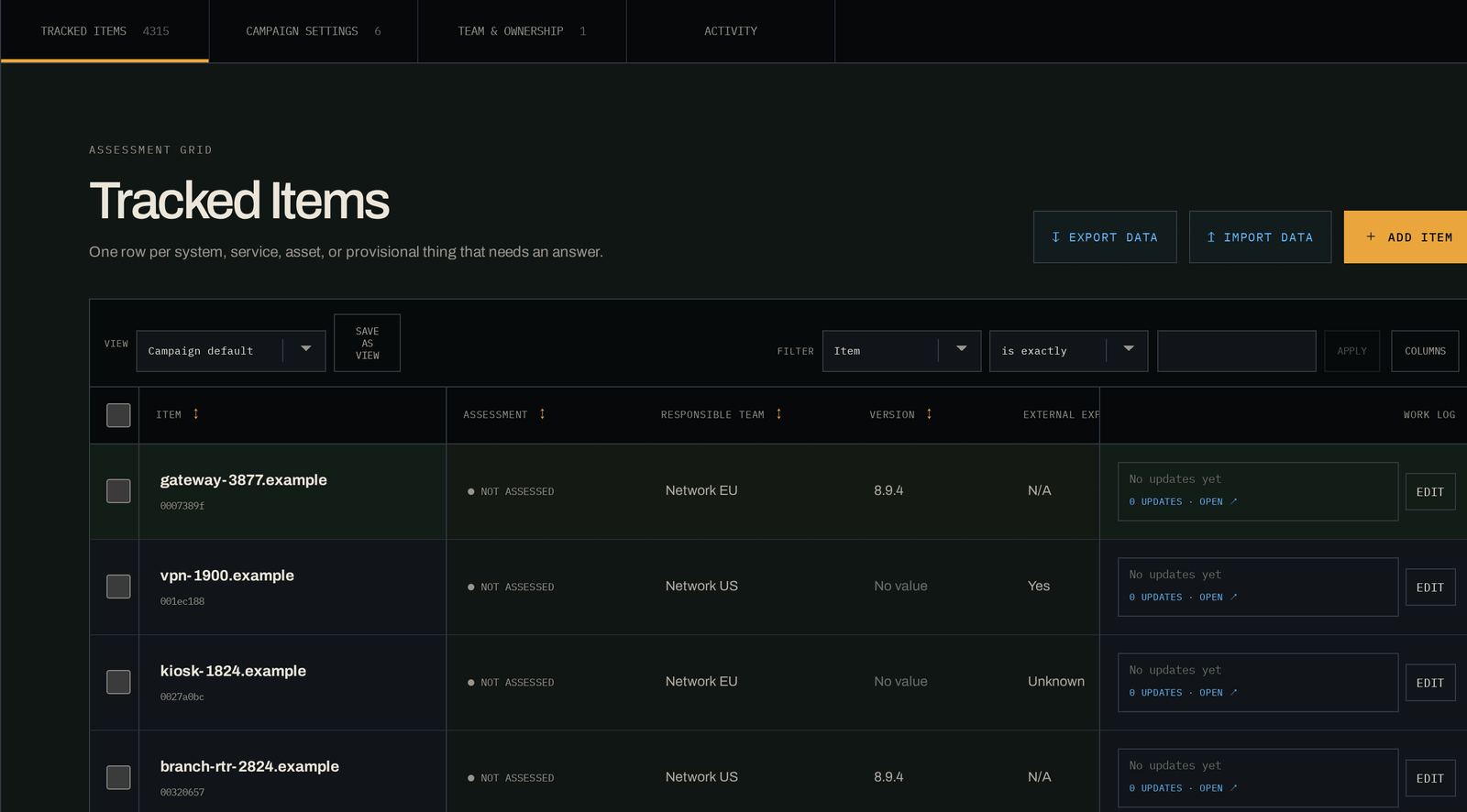
One Campaign, 4,315 candidates, five blocked rows.
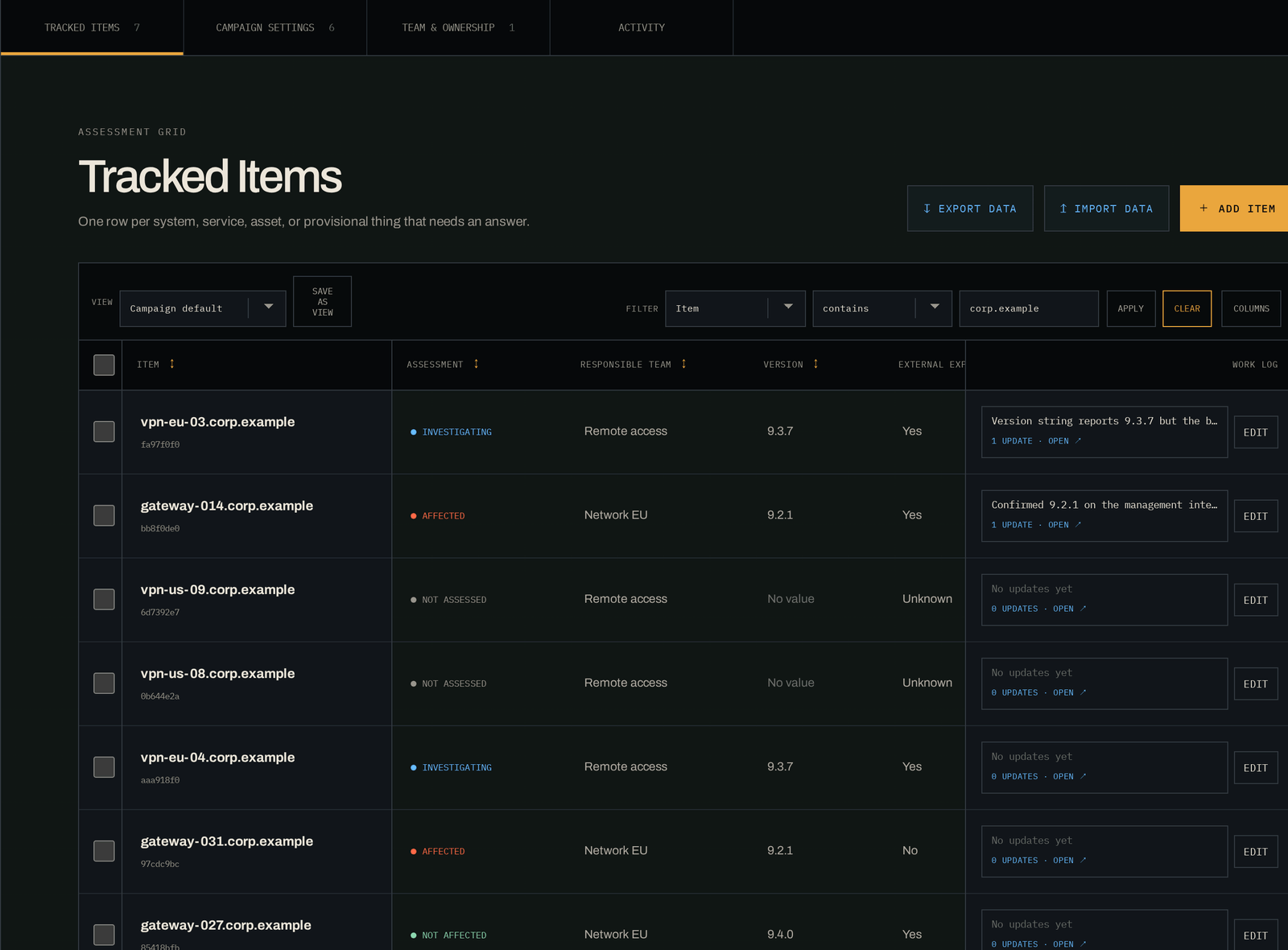
A vendor publishes an out-of-band advisory. Your inventory and the vendor's device list use different names, and several teams have to confirm versions and reachability. These are screens from that Campaign in the running application.
01 · Bring in the list
Scrollable image. Use the arrow keys to move across it.
02 · Work it at size
Scrollable image. Use the arrow keys to move across it.
03 · Narrow it without hiding it
Scrollable image. Use the arrow keys to move across it.
The product model
The Campaign stays useful as the response changes shape.
Start with a partial candidate list. Add structure as the team learns. Work the list in groups without flattening every Item into the same answer. Publish status from the record the responders use.
Start with the response, not a fixed schema.
Open a Campaign from a template or a blank page, choose the fields the response needs, and give Owners, Workers, and Viewers the access their role requires.
- Typed fields and controlled tags
- Campaign roles, groups, and access grants
- Safe field changes as the response evolves
Bring in a messy candidate list without losing its source.
Paste rows or import CSV and XLSX files. Review mappings, invalid values, and duplicate candidates before the list becomes part of the Campaign.
- Dry runs before an import is committed
- Source and import provenance on each Item
- Approved read-only Data Sources for repeat feeds
Update 10 or 1,000 items without creating 1,000 tickets.
Filter the list, save team views, and apply one decision to a selected group while every Item remains available for its own assessment and follow-up.
- Fast grid editing and saved views
- Grouped changes with validation
- Conflict handling when two updates collide
Give the next shift the reason behind the latest value.
Attach Work logs to the Campaign and its Items. Keep revisions, mentions, authorship, and change history with the list they explain.
- Timestamped Work logs and revisions
- Mentions and bulk notes for handoffs
- A durable record of field and access changes
Join duplicates without erasing earlier work.
Use stable identifiers to spot Items that may represent the same system. Review the suggestion, link the records, and reverse the decision if later facts disagree.
- Canonical identifiers and duplicate suggestions
- Non-destructive, reviewable consolidation
- Permission-filtered search across Campaigns
Publish a status people can rely on.
Set a reporting rhythm, publish a fixed snapshot, and answer leadership questions from the same governed list the response team is working.
- Scheduled updates, reminders, and overdue signals
- Leadership views for scope, risk, freshness, and blockers
- Scoped API credentials and signed webhooks for handoffs
The number you report
A published status keeps the figures it was published with.
When you publish a status update, KnownScope freezes the narrative and the counts together as they stood at that moment. Later work doesn't rewrite what you told people last Thursday, so the record of what you said still matches what you knew.
- Every field value carries who changed it, when, and through which route: a person, an API credential, or an import run.
- A revised assessment keeps the earlier one and the reason it changed, so you can reconstruct the decision months later.
- Work history stays attached to the Campaign it explains. That includes the entries written at 3am by whoever had the shift.
Where it stops
Keep the systems that already have a clear job.
KnownScope sits between the systems that produce candidates and the queue that owns the fix. It doesn't replace chat, evidence storage, scanners, or your change system.
Inputs
Candidate items and attributes
Scanner results, inventory, supplier notices, CSV files, and pasted lists.
KnownScope
Changing scope and its record
Campaign fields, assessment decisions, Work logs, access, and change history.
Remediation
The fix
Jira, ServiceNow, change systems, or the work queue your team already uses.
- Conversation
- Meetings and chat stay fast. Decisions that must survive the response are recorded in the Campaign.
- Evidence
- Forensic artifacts, packet captures, and regulated evidence remain in the approved evidence system.
- Data movement
- Governed files, scoped API credentials, and approved Data Sources use the same validation, permission, and provenance rules.
- Connector boundary
- Integrations use bounded configuration and audited handoffs. KnownScope does not run arbitrary scripts or unrestricted network requests.
Next step
Use one response to evaluate the product.
Pick an advisory, exposure, supplier incident or investigation you have already worked. We'll map it onto a Campaign and you can see where it fits and where it doesn't.